
Keeping Three Revit Models in Step: A Coordination Narrative from a UK Office Building
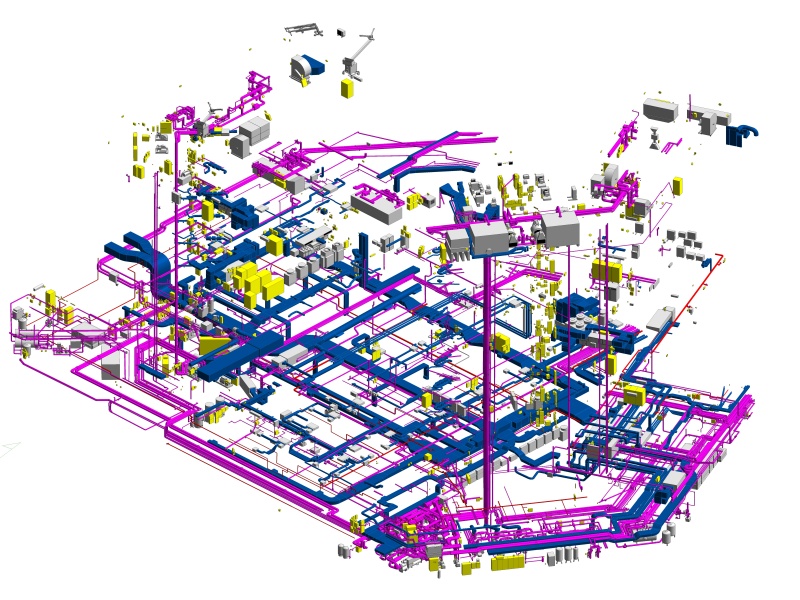
Large buildings rarely fit in one model file, and that was the first fact the team met on Project 701.UK. The office building in the west of the United Kingdom has two basement levels and fourteen upper floors, and the scope covered architecture, structure, topography and MEP. Splitting the work was necessary; keeping the pieces consistent was the real task.
One coordinate system for three files
The model was divided into Architecture, Structure and MEP files. Before any element was drawn, the team set a unified project coordinate system and used shared coordinates so every file sat in the same position relative to the others. Each model was given ownership of specific object types at the start, which stopped two files from describing the same wall or beam. Teams that need this kind of discipline on an existing building usually start from a as-built BIM modeling services workflow, because the scan gives every discipline the same physical reference.
Federated checks, not final surprises
All three models were linked into one federated model. Architecture and structure were compared on a regular schedule in Revit and Navisworks, so spatial and connection problems surfaced while they were still cheap to fix. Wall materials were handled the same way: the team set up a verification workflow with filters, schedules and TrueView so each wall type matched the data the client had supplied.
The MEP problem: thin data and dense space
MEP was harder. Only PDFs and exterior photos were available at the estimating stage, which made it difficult to judge plant rooms, corridors, ceiling voids and service shafts. The team estimated by benchmarking against similar completed projects and the building's area, type and system density. During modeling, the basement scan quality was poor and the rooftop plant rooms fed tall shafts that were hard to capture, so dedicated people modeled the shafts and line routes, and parametric families sped up repeated objects.
Verification before delivery
Quality control used several layers: sectional views, Navisworks checks and in-house point cloud analysis tools. The aim was a tolerance within ±15 mm for the MEP model, with thousands of ducts, pipes, fittings and cable trays reviewed inside a short QA-QC window. The finished set reached LOD 300 and was built from point cloud and TrueView data.
The full project record, including inputs and deliverables, is on the page for Revit modeling services for office building at UK, and it shows how coordination decisions made on day one shaped the final handover.