
From Schedule to Simulation: How a 4D BIM Review Actually Runs
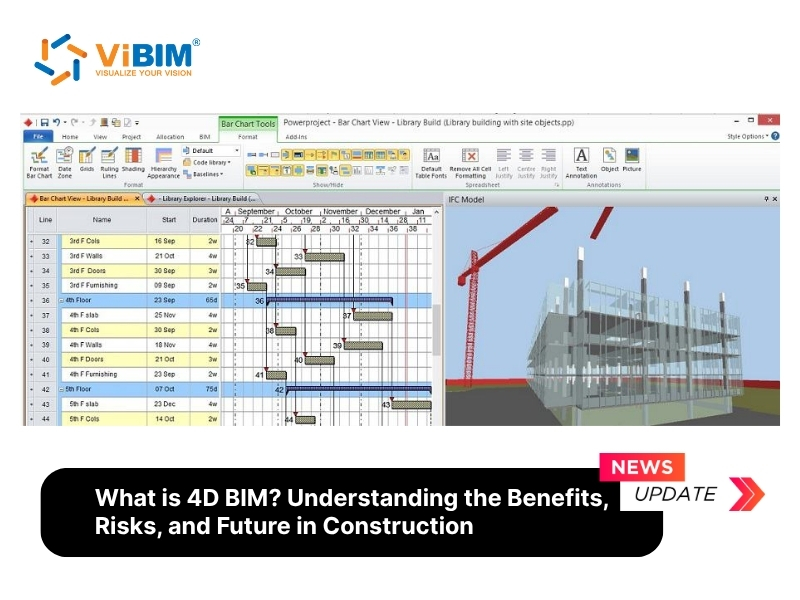
A construction sequence that looks sensible on a Gantt chart can fall apart the moment someone asks where the crane will stand in week twelve. A 4D BIM review exists to ask that question early, while changing the plan still costs nothing. What follows is a walk through how such a review runs, from the first file received to the final sign-off of the sequence.
Most teams begin with the 3D model. Before anything is linked, someone checks whether the model is detailed enough for sequencing. A slab drawn as one object cannot show three separate pours, so it gets split. This is a modeling task, and it is often where the review first slows down, because the designer's model was built to describe the finished building rather than the order of work.
In parallel, the planner prepares the schedule, usually in Primavera P6 or Microsoft Project. Every task needs a duration, dates and dependencies. A model that is carefully built cannot rescue a schedule that is loose, since the simulation will faithfully display whatever the plan says, including its mistakes. Teams that coordinate models and documents in a shared environment, for example through BIM collaboration using ACC, find it easier to keep the right versions of both in front of everyone during this stage.
The linking step comes next. In Navisworks or Synchro 4D, the coordinator attaches model elements to schedule tasks, so the footing elements follow the task for pouring footings. Once the links exist, the software plays the build forward and backward. The review meeting then becomes a conversation around the screen rather than around a table of dates.
What the group looks for is specific. They look for a crane moving through a space that scaffolding will occupy at that date. They check that deliveries have a route in. They check that high-risk activities are not stacked into one small area, which gives the safety manager something concrete to plan against. Each finding goes back into the schedule, the simulation is regenerated, and the group reviews it again.
Verification matters too. When site progress is captured and compared with the plan, the team can see variance as it appears and act before it grows. Periodic point cloud scans can support this, because they give a measured record of what stands on site.
Cost and skills deserve an honest mention. Software, hardware and training all take budget, and few people are fluent in both BIM tools and construction process. Interoperability between platforms can also cost time through manual rework. These are reasons to start small, with one clear sequence question, and grow from there.
Our short guide on what is 4D BIM for construction covers the definition, benefits and software options in more depth for teams that want the background before running their first review. The practical lesson from the walkthrough above stays the same: link a trustworthy model to a trustworthy schedule, watch the sequence together, and fix what the simulation exposes before work starts on site.